One email. That is all it takes. You open your inbox one morning and there it is, a polite message from a company you trusted with your name, your address, maybe even your card details: “We are writing to inform you about a security incident involving your personal information.”
If that email has never landed in your inbox, count yourself lucky, because the numbers say it is becoming harder to avoid. Verizon’s 2026 Data Breach Investigations Report analysed more than 22,000 confirmed breaches across 145 countries. IBM’s 2026 Cost of a Data Breach report put the global average cost of a single breach at $4.99 million, the highest figure it has ever recorded.
So what is a data breach, exactly? How does one happen, and more importantly, what should you do when your own information is caught up in one? This guide answers all of it in plain language, with the causes, the real examples and a clear step-by-step plan for what to do next.
Table of Contents
What Is a Data Breach? A Simple Definition
A data breach is an incident where information is accessed, viewed, stolen or exposed by someone who has no authorisation to see it. The information is usually sensitive: names, email addresses, passwords, financial details, health records or business secrets.
Notice what the definition does not say. A breach does not have to involve a hooded hacker in a dark room. A breach can be a criminal breaking into a database, yes. But it can also be an employee sending a customer spreadsheet to the wrong email address, a stolen laptop with unencrypted files on it, or a cloud storage folder that someone forgot to lock down. If protected data ends up in the wrong hands, or even just at risk of it, it is a breach.
Here is the short version worth remembering: a data breach happens when data that should stay private does not.
What Kind of Information Gets Stolen in a Data Breach?
Not all stolen data is equal. Attackers go after whatever they can sell, reuse or hold to ransom, and it generally falls into a few buckets.
Personal information
Names, home addresses, phone numbers, dates of birth and government ID numbers. On their own these details look harmless. Combined, they are the raw material of identity theft, because they answer the security questions banks and services use to verify you.
Financial information
Card numbers, bank account details and payment records. This is the fastest data to turn into money, which is why payment systems are attacked so relentlessly. It is also why exposed card data usually gets cancelled and replaced quickly, while exposed identity data, which you cannot replace, is the bigger long-term problem.
Login credentials
Email and password pairs are gold for attackers because people reuse passwords. A password leaked from one small website gets tested automatically against banking, email and social accounts in what is called a credential stuffing attack. One lazy password can quietly unlock your whole digital life. This is also where breaches and malware meet: infostealer malware harvests saved passwords from infected computers and feeds them into the same underground market.
Health and business records
Medical files are among the most valuable records on criminal markets because they contain ID numbers, insurance details and personal history in one place, and unlike a card, a medical history cannot be reissued. For businesses, stolen customer databases, source code and internal emails bring ransom demands and legal trouble on top of the cleanup bill.
Data Breach vs Data Leak vs Cyber Attack: What Is the Difference?
These three terms get mixed up constantly, sometimes even in news headlines. They are related, but they are not the same thing.
| Term | What it means | Simple example |
|---|---|---|
| Data breach | Data is accessed or stolen by an unauthorised party, usually through a deliberate attack or a serious failure | A criminal exploits a software flaw and downloads a customer database |
| Data leak | Data is exposed accidentally, with no attacker breaking in | A company leaves a cloud folder public and anyone with the link can open it |
| Cyber attack | Deliberate action against a system; a breach is only one possible result | A ransomware attack, a DDoS flood, or a phishing campaign |
A helpful way to picture it: a cyber attack is the break-in attempt, a data breach is the burglar getting away with your jewellery, and a data leak is you leaving the front door wide open so nobody needed to break in at all. A leak can turn into a breach the moment a criminal finds and copies the exposed data, which is why security teams treat both seriously.
What Causes a Data Breach? How Breaches Actually Happen
Ask ten people how breaches happen and most will describe a genius hacker typing furiously. Reality is less cinematic and more procedural: attackers use a small set of reliable doors, and most breaches walk through one of them.
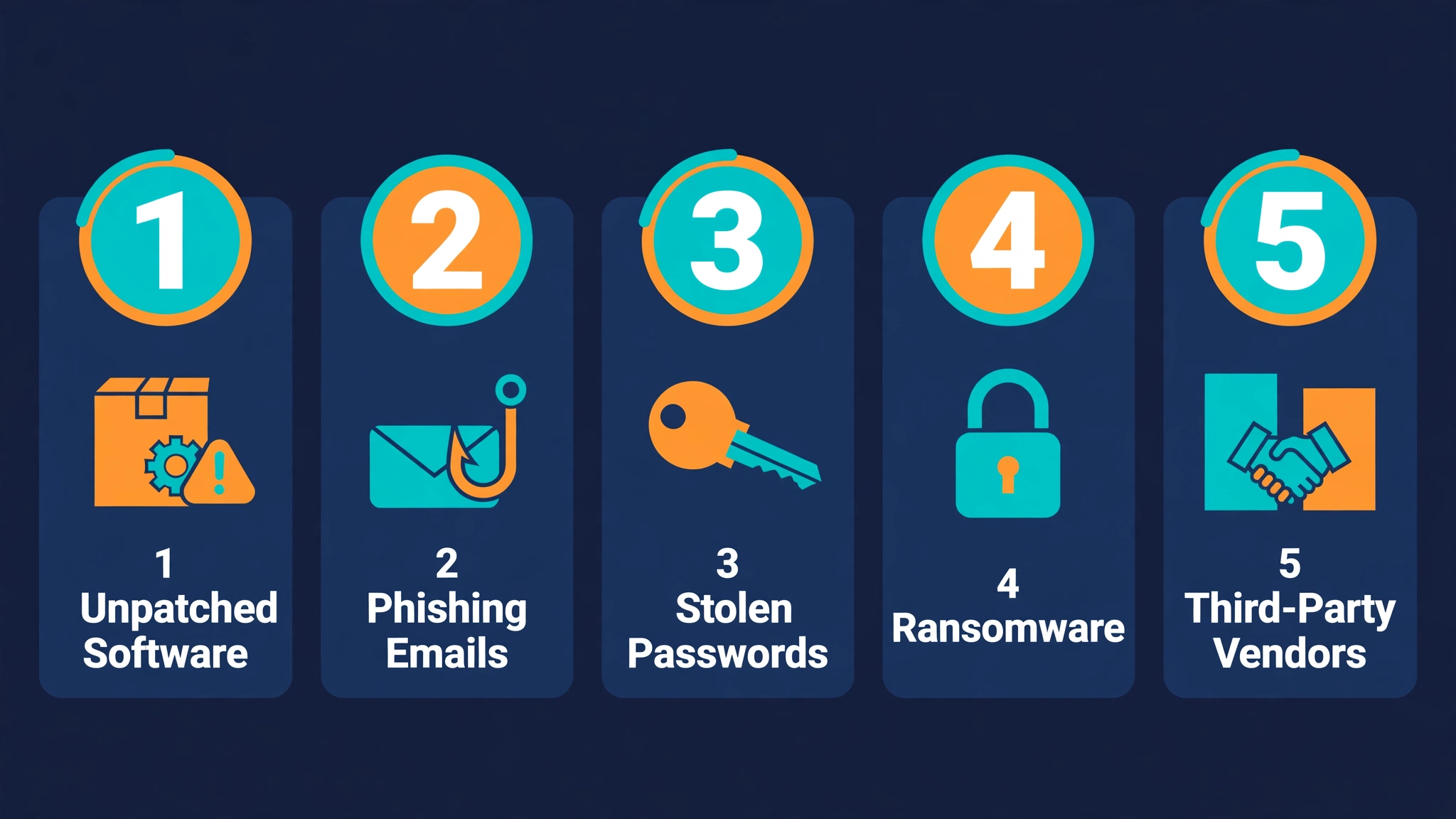
Unpatched software flaws are now the number one cause
The single biggest entry point in the 2026 DBIR, at 31% of breaches, was exploitation of vulnerabilities, known security flaws in software that had not been patched. Read that again. The front door was not picked by a master thief; it was left unlocked months after the lock maker announced it was faulty. Attackers scan the internet constantly for systems running outdated software, and they usually find them.
Phishing and stolen passwords
Phishing was involved in 16% of breaches and credential abuse in 13%. These two go together: a convincing fake email or login page tricks someone into handing over their password, and the attacker simply logs in like an employee. No alarms, no broken glass. If you want to understand how these messages work and how to spot them, our guide on what phishing is and how it works walks through real examples.
Ransomware that steals before it locks
Ransomware appeared in 48% of breaches in the 2026 DBIR. Modern ransomware groups rarely just encrypt files. They copy the data first, then threaten to publish it unless they are paid, which means a ransomware attack is now almost always a data breach too.
Third parties and suppliers
Nearly half of breaches, 48%, involved a third party in some way: a supplier, a software vendor, a payment processor. You can lock your own doors perfectly and still lose data because a company you trusted did not lock theirs. Large organisations work with hundreds of vendors, and every one of them is another door.
Honest mistakes and insiders
Not every breach is an attack. Files get emailed to the wrong person, databases get misconfigured, laptops get left in taxis. And occasionally the call comes from inside the house: a disgruntled or bribed employee with legitimate access copies data they were trusted to protect. These cases are a minority, but they are the hardest to prevent with technology alone.
The 3 Types of Data Breaches
Security professionals classify breaches using the CIA triad, and no, not that CIA. It stands for confidentiality, integrity and availability, and every breach breaks at least one of the three.
1. Confidentiality breach. Private information is seen or copied by someone unauthorised. This is the classic breach, the stolen customer database, and it is by far the most common type.
2. Integrity breach. Data is altered without permission. Imagine someone quietly changing bank account details on invoices, or editing records in a database. Nothing looks stolen, which makes this type sneaky and dangerous, because decisions get made using data that is no longer true.
3. Availability breach. Data is destroyed, encrypted or made inaccessible. Ransomware is the textbook example: the data may never leave the building, but the owner cannot use it, and that alone counts as a breach.
Breaches are also grouped by how they happen: physical breaches (stolen devices or paper files), digital breaches (hacking and malware), and accidental breaches (misdelivery and misconfiguration). Most real incidents mix the categories, which is why the response steps further down this page matter more than the label.
Real Data Breach Examples and What Went Wrong
Equifax, 2017: the patch that never happened
Attackers entered Equifax, one of the largest credit reporting agencies in the world, through a known flaw in a web application framework. A patch existed. It had existed for roughly two months. It was never applied to that system. The personal data of about 147 million people, including Social Security numbers, was taken. It remains the clearest lesson in breach history: the number one cause of breaches today, unpatched software, is not new.
Target, 2013: the breach that came through a supplier
The attackers who hit US retailer Target did not start with Target. They stole login credentials from a small refrigeration and HVAC contractor that had access to Target’s systems, walked in through that side door, and installed malware on payment terminals. Debit and credit card data for about 40 million customers followed. Third-party access is a genuine risk, exactly as the 2026 DBIR numbers keep showing.
Yahoo, 2013–2014: the biggest of them all
Yahoo’s 2013 breach affected all 3 billion accounts, and a separate 2014 breach hit about 500 million.
The pattern across all three: none of these required movie-style hacking genius. A missed patch, a trusted vendor, a reused password. Ordinary failures, extraordinary consequences.
Data Breach Statistics and Costs in 2026
- $4.99 million: the global average cost of a data breach in 2026, a record high according to IBM’s Cost of a Data Breach report.
- $11.5 million: the average cost for organisations in the United States, the highest of any country.
- 247 days: the average time to identify and contain a breach, 183 days to spot it and 64 to shut it down.
- 22,000+: confirmed breaches analysed in Verizon’s 2026 DBIR, from more than 31,000 security incidents.
- 3,321: data compromises recorded in the United States in 2025 by the Identity Theft Resource Center, a record year.
Two things stand out. Breaches are expensive mostly because they are discovered late, and the most common causes are preventable basics. That combination is frustrating, but it also means the prevention section below genuinely works.
How to Check If Your Data Was in a Breach
You do not need to wait for a bad headline to find out. Three checks take less than five minutes.
Step 1: Check Your Email Address on Have I Been Pwned
Go to haveibeenpwned.com, type in your email, and the site tells you whether it appears in any known breach collection. It is free, run by a respected security researcher, and it has tracked billions of exposed accounts. While you are there, use the password checker on the same site for any password you have used for years; if a password shows up in breach data, retire it everywhere.
Step 2: Read Breach Notification Letters Properly
Companies that suffer a breach are usually required to notify affected people. These letters are easy to ignore because they read like legal boilerplate, but they tell you exactly which data was involved, and that detail decides how urgent your response is. “Email addresses only” is a nuisance. “Social Security number and date of birth” is a drop-everything situation.
Step 3: Know the Warning Signs
You also may already be in a breach if password reset emails arrive that you did not request, if your password suddenly stops working on an account, if you see logins from places you have never been, or if small unfamiliar charges appear on a card. One sign can be a glitch. Two together are a message.
What to Do After a Data Breach: 9 Steps
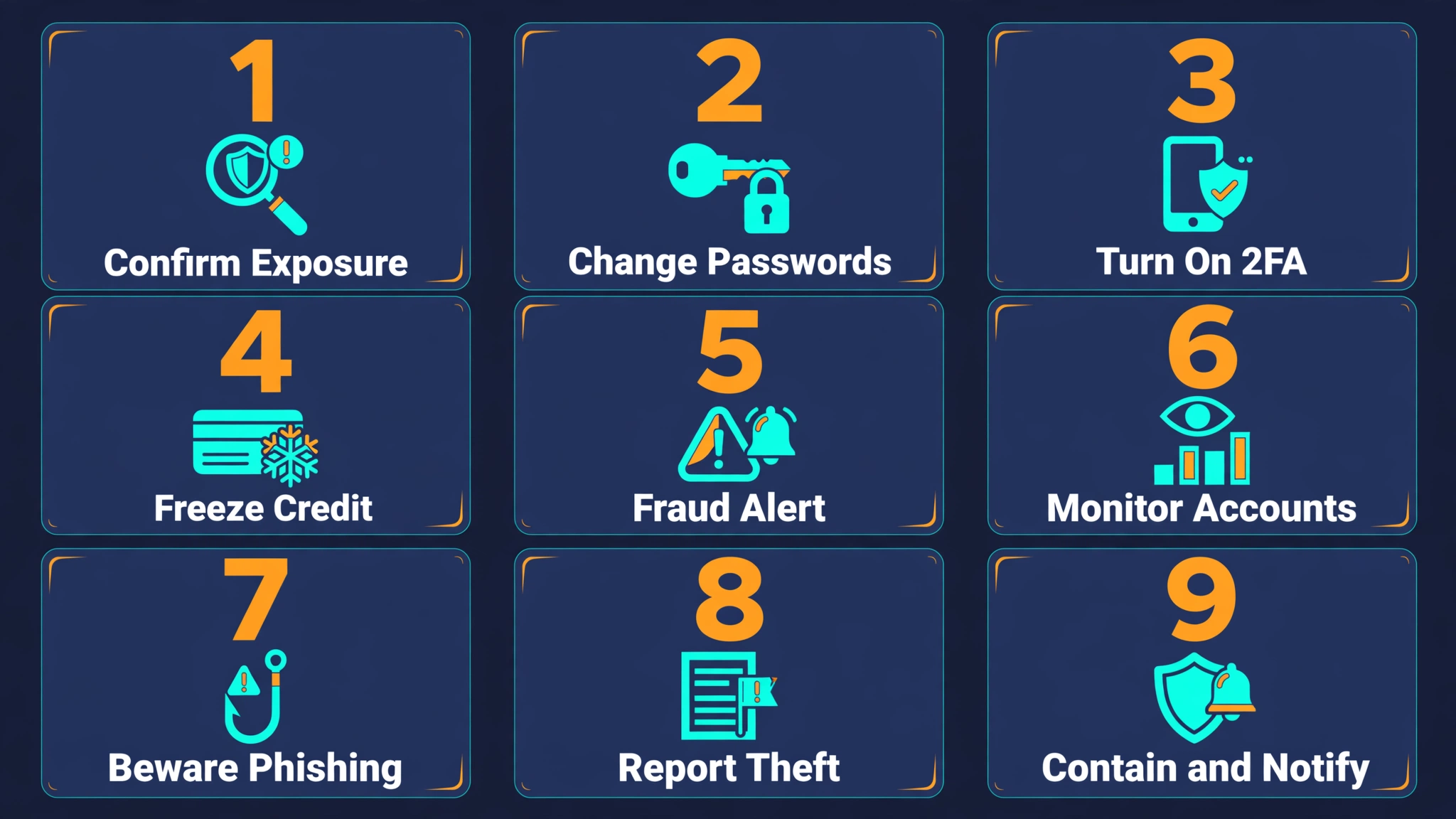
Your data has been exposed. What now? Do not panic, but do not shrug either. Work through these steps in order; the first three are urgent, the rest build your protection back up.
Step 1: Confirm What Was Actually Exposed
Find the official notice from the company, on their website rather than through a link in an email, because scammers send fake breach emails too. Identify the data types involved.
Step 2: Change the Password on the Affected Account First
Make it long, unique and never used anywhere else. Then change the password on any other account where you reused the same one, starting with your email account, because email resets everything else.
Step 3: Turn On Two-Factor Authentication, or a Passkey
A stolen password is useless to an attacker if a second step blocks the door. Authenticator apps and passkeys are stronger than text message codes.
Step 4: Freeze Your Credit If ID Data Was Exposed
If your government ID number or date of birth leaked, a credit freeze stops criminals opening accounts in your name. In the US, guidance and reporting run through the FTC’s identity theft portal.
Step 5: Put a Fraud Alert in Place
A fraud alert tells lenders to verify identity extra carefully before approving credit. It is free and quick to set.
Step 6: Watch Your Bank and Credit Reports Weekly
Look for small test charges and unfamiliar accounts. Attackers often start tiny to see if anyone is watching.
Step 7: Expect Follow-Up Phishing
Breach data gets used to craft personalized scams that mention real details about you. Be suspicious of urgent messages, even ones that know your name and address, and review the red flags in our phishing guide before you click anything.
Step 8: Report Identity Theft If It Happens
If accounts appear that are not yours or money goes missing, report it officially and tell your bank. The paper trail protects you from liability.
Step 9: If You Run a Business, Contain First, Then Notify
Isolate affected systems, preserve evidence, get legal advice, and notify regulators and customers within the deadlines your country requires. Hiding a breach always ends worse than disclosing one.
How to Prevent a Data Breach
Prevention advice can sound like a broken record, but the breach statistics explain why: the boring basics block the most common causes.
For individuals: use a password manager so every account gets a unique password; turn on two-factor authentication wherever it exists; install updates promptly, including on apps you barely open; and treat unexpected attachments and login links as guilty until proven innocent. Keeping your devices clean of malware closes the infostealer route that feeds stolen-password markets.
For businesses: patch internet-facing systems first, because unpatched flaws are the top entry point in the 2026 DBIR. Limit who can access what, back up data and test those backups, train staff against phishing, and vet suppliers’ security before handing them your customers’ data, not after. CISA publishes free, plain-language guidance for all of this at cisa.gov.
Key Takeaways
- What is a data breach? It is any incident where private data is accessed, stolen or exposed without authorisation, whether by hackers, accidents or insiders.
- In 2026 the top causes are unpatched software flaws (31% of breaches), phishing, stolen credentials and ransomware.
- The average breach costs $4.99 million and takes 247 days to identify and contain.
- You can check your own exposure in minutes on Have I Been Pwned.
- If your data leaks: change passwords, switch on two-factor authentication, freeze credit if ID data was involved, and watch for follow-up scams.
Frequently Asked Questions
What is a data breach in simple words?
A data breach is when information that should be private, like passwords, card details or personal records, is accessed, copied or exposed by someone who should not have it. It can happen through hacking, but also through mistakes, lost devices or careless configuration.
What happens if you were in a data breach?
It depends on what was taken. Email addresses alone usually lead to more spam and phishing. Passwords put accounts at risk if you reuse them. Government ID numbers and financial data can lead to identity theft and fraudulent accounts, which is why those breaches need immediate action like a credit freeze.
What are examples of data breaches?
Famous examples include Equifax in 2017, where about 147 million people’s data was taken through an unpatched software flaw; Target in 2013, entered through a supplier’s stolen credentials; and Yahoo, whose 2013 breach affected all 3 billion accounts, with a separate 2014 breach hitting about 500 million more.
How do I know if I am part of a data breach?
Check your email address on Have I Been Pwned, which searches known breach collections. Also watch for notification letters from companies, unexplained password resets, logins from unfamiliar locations and small charges you do not recognise.
What is the number one cause of data breaches?
According to Verizon’s 2026 DBIR, exploiting unpatched software vulnerabilities is the top initial cause, involved in 31% of breaches, followed by phishing and credential abuse.
Is a data breach the same as a hack?
No. A hack is a deliberate break-in. A breach is the result, data being accessed or taken. Many hacks cause breaches, but breaches also happen without any hacking, through accidents, misconfiguration or insider misuse.
What is the difference between a data breach and a data leak?
A breach usually involves unauthorised access, often deliberate. A leak is accidental exposure, such as a database left open to the public. A leak becomes a breach once criminals find and copy the exposed data.
Can a data breach lead to identity theft?
Yes, when the stolen data includes names combined with ID numbers, dates of birth or financial details. That is the combination criminals use to open accounts, take loans or file false tax returns in a victim’s name.
How much does a data breach cost in 2026?
IBM’s 2026 report puts the global average at $4.99 million per breach, and $11.5 million in the United States. For individuals the “cost” is usually time, stress and fraud losses rather than a single bill, which is why fast action matters.
What should I do first if my data is breached?
Change the password of the affected account, then any account sharing that password, and switch on two-factor authentication. If ID or financial data was involved, add a credit freeze and start monitoring your accounts closely.